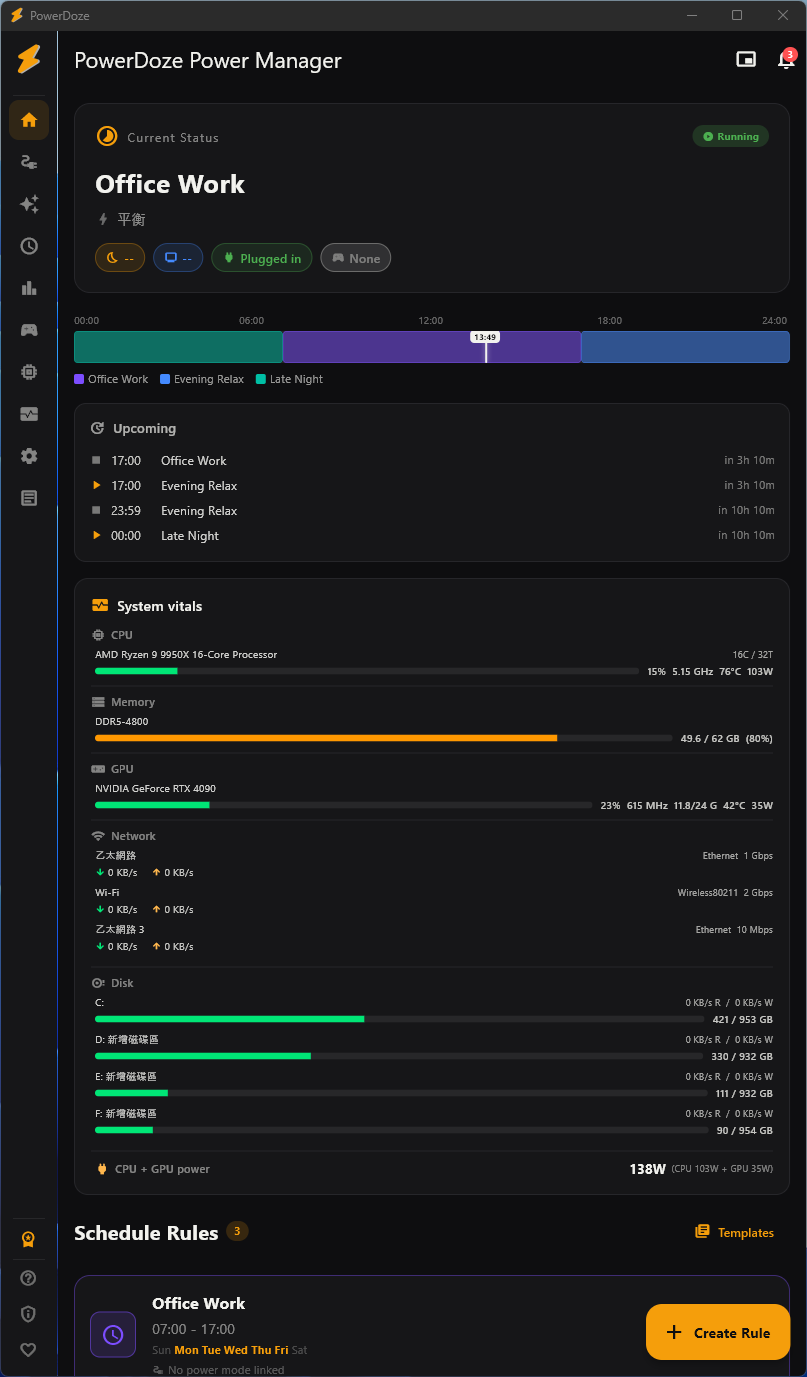
Your PC sleeps mid-download, won't sleep at night, or quietly resets your power settings. PowerDoze handles it for you — keeps apps awake while they're working, then lets the PC sleep on its own. Free, 100% local.
Sound familiar? PowerDoze quietly handles all of it.
No telemetry · Verify the installer's SHA-256 yourself · Made by a solo developer · Uninstall restores Windows defaults
Tell PowerDoze what should never get interrupted and when the PC should rest. It watches time, apps, fullscreen, Wi-Fi, and whether you're there — and adjusts in the background.
Define when your PC should sleep, which apps prevent sleep, and what power mode to use for each time slot.
It watches the time, running apps, fullscreen state, Wi-Fi network, and your activity level — silently.
Power settings change automatically. No manual switching. Always the right mode for what you're doing.
20+ features from scheduling to analytics. Core ones free forever.
Schedule when your PC sleeps — different timeouts for work hours, evenings, and weekends.
One-click profiles bundling CPU, screen, thermal, and GPU settings together.
Games, movies, and presentations automatically pause sleep timers. Zero setup.
Map apps to power modes. Premiere Pro → High Performance. Switch back on focus change.
Different power profile per Wi-Fi network. Office, home, café — auto-switched.
Auto-switch modes based on battery level and charger state. Low battery? Eco mode.
No subscription. No hidden fees. Early customers get launch pricing.
Locks in at this price forever — regular NT$690 / US$20.99 after the first 1,000.
One-time purchase. 14-day money-back guarantee.
Secure payment. Your Pro license activates instantly after payment.
Estimate based on PowerDoze users' typical 30% energy reduction. Adjust the inputs to match your setup.
PowerDoze Pro pays for itself in —.
Estimate based on a typical 30% reduction during idle periods (auto-sleep, screen timeout, CPU mode switching). Heavy 24/7 workloads save less by %; mostly-idle PCs save more.
Beyond electricity: Pro also automates power-mode switching, multi-monitor refresh rate, and per-app GPU preference — saving you manual hassle and reducing hardware stress from constant max load.
Compatible with Windows 10 (1903+) and Windows 11.
Install from Microsoft StoreOne-click install · No SmartScreen warning · Automatic updates
On a phone? PowerDoze is a Windows 10/11 desktop app — open powerdoze.app on your PC to install.
The Microsoft Store above is the easiest way to install. If you'd rather grab the installer or a portable build yourself, they're here.
0E31A4C4B7F34859A1BE304198A71DABA801BAE1B46BBBD8C58D3C8C21485782
Get-FileHash .\PowerDoze_Setup_v2.2.0.exe
Only relevant if you chose the direct download above. Installing from the Microsoft Store skips this entirely.
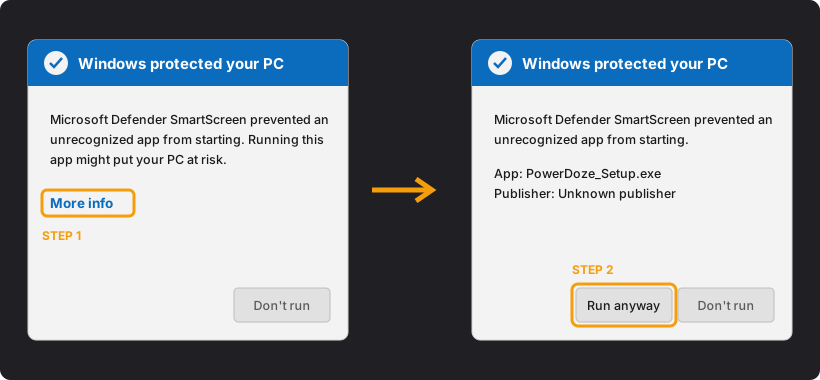
The direct-download build isn't code-signed yet, so SmartScreen may warn you. Installing from the Microsoft Store avoids this completely, or verify the SHA-256 above yourself. Either way, it's the same PowerDoze.
This isn't part of the main installer because it includes a component that some antivirus software flags by default — it's a known false-positive pattern, not a virus. Skip it if you'd rather not deal with that; PowerDoze works fully without it, just without exact CPU temperature and wattage.
PowerDoze is made by one person — Nisonxi, a solo developer in Taiwan. I built it because my own PC sat idle at almost full power all day and nothing on the market fixed it properly: the built-in plans and sleep timer are static, and other tools each solve only one piece. It started as the tool I used every day, then became a product.
Read the full story →